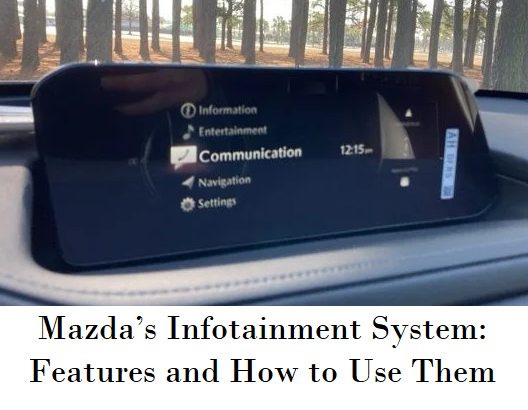
Mazda's vehicles are known for their engaging driving experience, but the brand also offers a sophisticated infotainment system that enhances connectivity, entertainment, and convenience. Mazda Connect, the brand’s infotainment system, is designed to be intuitive and user-friendly, allowing drivers to stay connected while keeping their focus on the road. In this blog, we’ll explore the key features of Mazda’s infotainment system and provide tips on how to get the most out of them.
Mazda Connect: The Hub of Your Driving Experience
Mazda Connect is the central hub for all your infotainment needs. It integrates audio, communication, navigation, and vehicle settings into a single, easy-to-use interface. The system is controlled via a combination of touchscreen inputs, a rotary dial, and voice commands, ensuring that you can interact with the system in a way that feels most natural to you.
- Rotary Dial Control: Located on the center console, the rotary dial allows you to navigate through the system’s menus without taking your eyes off the road. The dial can be turned, pressed, and tilted to select and adjust various functions, making it easy to control the infotainment system while driving.
- Touchscreen Interface: The touchscreen provides a direct way to interact with the system, allowing you to tap and swipe through menus and options. While the touchscreen is convenient when the vehicle is stationary, Mazda has designed the system to be primarily operated via the rotary dial for safer use while driving.
- Voice Command: Mazda Connect also supports voice commands, allowing you to control many functions hands-free. Simply press the voice command button on the steering wheel and speak your command. This feature is especially useful for tasks like making phone calls, setting navigation destinations, or adjusting audio settings.
Connectivity: Stay Connected on the Go
Mazda’s infotainment system offers a range of connectivity options to keep you connected while on the road.
- Bluetooth®: Pair your smartphone with Mazda Connect via Bluetooth to make hands-free calls, send and receive text messages, and stream music wirelessly. The system allows you to connect multiple devices, so passengers can also share their music playlists.
- Apple CarPlay® and Android Auto™: Mazda Connect supports both Apple CarPlay and Android Auto, allowing you to seamlessly integrate your smartphone with the infotainment system. With these features, you can access your favorite apps, navigate with real-time maps, listen to music, and even send messages using Siri or Google Assistant—all through the familiar interface of your phone.
- USB Ports: Mazda vehicles are equipped with multiple USB ports, allowing you to charge devices and connect them to the infotainment system. Use the USB ports to play music directly from a flash drive or connect your smartphone for a more stable connection than Bluetooth.
- Wi-Fi Hotspot: Some Mazda models offer an available Wi-Fi hotspot, allowing you and your passengers to stay connected to the internet while on the go. The Wi-Fi hotspot can support multiple devices, making it ideal for road trips or long commutes where passengers want to stream content or browse the web.
Navigation: Find Your Way with Ease
Mazda’s infotainment system includes a built-in navigation system that provides turn-by-turn directions, real-time traffic updates, and 3D map views. The navigation system is designed to be intuitive and easy to use, ensuring that you can reach your destination with confidence.
- Search for Destinations: You can search for destinations by entering an address, searching for points of interest, or selecting a location from your favorites. The system also allows you to search for nearby services, such as gas stations, restaurants, and parking, making it easier to find what you need while on the road.
- Real-Time Traffic Updates: The navigation system provides real-time traffic updates, helping you avoid congestion and find the fastest route to your destination. If traffic conditions change while you’re on the move, the system can automatically reroute you to save time.
- Voice-Guided Navigation: For added convenience, the navigation system offers voice-guided directions, allowing you to keep your eyes on the road while receiving turn-by-turn instructions. You can also use voice commands to set or change your destination without taking your hands off the wheel.
- 3D Map Views: The navigation system’s 3D map views provide a more detailed and immersive view of your surroundings, making it easier to navigate complex intersections and unfamiliar areas.
Entertainment: Enjoy Your Favorite Media
Mazda Connect offers a range of entertainment options to keep you and your passengers entertained on the road.
- AM/FM Radio and HD Radio™: Enjoy your favorite radio stations with the option of HD Radio, which provides higher-quality sound and additional digital channels. The system allows you to save your favorite stations for quick access.
- SiriusXM® Satellite Radio: With a subscription to SiriusXM, you can enjoy hundreds of channels of music, news, sports, and entertainment. Mazda Connect’s interface makes it easy to browse channels and find the content you want to listen to.
- Streaming Services: If you prefer streaming services like Spotify, Pandora, or Apple Music, you can access them through Apple CarPlay or Android Auto. Simply connect your smartphone and stream your favorite playlists, podcasts, or audiobooks directly through the infotainment system.
- USB and Auxiliary Inputs: If you have a collection of music stored on a USB drive or prefer to connect an external media player, Mazda Connect allows you to play music via the USB or auxiliary input. The system’s interface lets you browse and select tracks, albums, and playlists with ease.
Settings and Customization: Tailor the Experience to Your Preferences
Mazda’s infotainment system offers a range of settings and customization options, allowing you to tailor the system to your preferences.
- Audio Settings: Adjust the sound to your liking with customizable audio settings. You can fine-tune the bass, treble, balance, and fader to create the perfect listening experience. Some Mazda models also offer premium audio systems from brands like Bose, providing high-quality sound for an immersive experience.
- Display Customization: Mazda Connect allows you to customize the layout and appearance of the display. Choose your preferred background, adjust the brightness, and arrange the menu options to suit your preferences. You can also customize the head-up display (if equipped) to show the information that’s most important to you.
- Driver Profiles: If multiple people drive your Mazda, you can create individual driver profiles that save each driver’s preferred settings, including seat position, mirror adjustment, and climate control preferences. This feature ensures that every driver can enjoy a personalized experience.
- Vehicle Settings: Access and adjust a variety of vehicle settings through Mazda Connect, including lighting, door locks, and safety features. This allows you to configure your Mazda to match your driving style and preferences.
Safety and Convenience Features
Mazda’s infotainment system also integrates with various safety and convenience features to enhance your driving experience.
- Rearview Camera: The infotainment screen displays the feed from the rearview camera when you shift into reverse, helping you navigate tight parking spaces and avoid obstacles.
- Parking Sensors: If your Mazda is equipped with parking sensors, the infotainment system provides visual and audible alerts to help you avoid collisions while parking.
- Driver Assistance Features: The infotainment system works in conjunction with Mazda’s i-ACTIVSENSE safety features, such as lane departure warning, adaptive cruise control, and blind-spot monitoring, to keep you informed and in control. These features provide real-time information on the infotainment display, allowing you to stay aware of your surroundings.
- Climate Control: Some Mazda models allow you to adjust the climate control settings directly through the infotainment system. You can set the temperature, fan speed, and airflow distribution to ensure a comfortable cabin environment.
Tips for Maximizing Your Infotainment Experience
To get the most out of Mazda’s infotainment system, consider these tips:
- Familiarize Yourself with the System: Spend some time getting to know the layout and features of Mazda Connect. Understanding how to navigate the menus and use the rotary dial, touchscreen, and voice commands will make it easier to access the features you need while driving.
- Keep Your Software Updated: Mazda periodically releases software updates for the infotainment system to improve performance and add new features. Check with your dealership to ensure your system is up to date.
- Use Shortcuts: Customize the system’s home screen with shortcuts to your most-used features, such as navigation, music, or phone contacts. This will save you time and reduce distractions while driving.
- Practice Safe Use: While Mazda Connect is designed to be as distraction-free as possible, it’s important to use the system responsibly. Set up your navigation, select your music, and make any necessary adjustments before you start driving to minimize distractions on the road.
Mazda Connect is a Powerful Tool
Mazda’s infotainment system, Mazda Connect, is a powerful tool that enhances the driving experience by offering seamless connectivity, entertainment, and convenience. Whether you’re navigating through a new city, enjoying your favorite music, or adjusting your vehicle’s settings, Mazda Connect makes it easy to stay connected and in control. By taking the time to explore its features and customize the system to your preferences, you can make the most of your Mazda’s infotainment system and enjoy every drive to the fullest.